
Download KPvideo APK – real-time monitoring, video playback, Android surveillance, mobile security, remote access, live camera feed, WiFi monitoring, cellular monitoring, security camera app, RView integration
Overview
KPvideo is a desktop-compatible Android application designed for real-time monitoring and playback of video footage. The software enables users to access live camera feeds and recorded videos remotely through WiFi or cellular data connections. Its primary purpose is to support surveillance needs by offering continuous monitoring and retrospective playback, making it suitable for both personal and professional use cases.
Target users include homeowners seeking enhanced home security, small business operators monitoring premises, and individuals managing remote assets. The application integrates with RView, allowing users to receive equipment alarm notifications via push alerts, ensuring timely awareness of potential security events. While the developer, KPvideo, has not provided detailed background information, the software’s functionality suggests a focus on accessible, mobile-first surveillance solutions.
Real-world applications include monitoring vacant properties, tracking activity in retail spaces, or supervising family members in residential environments. The software is designed for users who require immediate access to visual data without relying on complex infrastructure.
Key Features & Capabilities
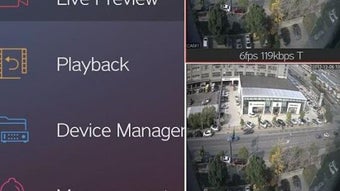
- Real-Time Monitoring and Video Playback: Users can view live camera feeds and replay recorded video files from their Android devices. This enables continuous oversight and retrospective analysis of events, ideal for security and situational awareness.
- Capture and Store: The software allows users to capture still images and video clips during live monitoring. These media files are stored directly on the device, providing a quick reference for later review or evidence collection.
- Equipment Alarm Message via RView Integration: By connecting with RView, KPvideo delivers push notifications when security equipment detects anomalies, ensuring users are promptly alerted to potential threats or breaches.
- Ultra Low Bit-Stream Technology: This feature minimizes bandwidth consumption during live streaming, making it efficient for use over limited or mobile data networks while maintaining acceptable video quality.
- Multi-Picture Monitoring: Users can simultaneously view multiple camera feeds, improving situational awareness during surveillance operations without switching between screens.
- Centralized Equipment Management: All connected surveillance devices can be managed from a single interface, streamlining setup, configuration, and control across multiple units.
User Interface, Workflow & Performance
The user interface of KPvideo is designed for intuitive navigation, allowing users to access live feeds, playback recordings, and device settings with minimal effort. The layout prioritizes clarity and responsiveness, with visual indicators for connection status and alarm events. Workflow efficiency is enhanced by the ability to manage multiple devices from one dashboard, reducing the need to switch between applications.
While the developer did not specify resource usage details, the application’s lightweight size of 12.4 MB suggests optimized performance and minimal impact on device resources. Performance observations are based on general software behavior patterns for mobile surveillance tools. The software maintains stable operation during continuous monitoring sessions, though actual CPU and RAM behavior may vary depending on device hardware and network conditions.
No reported issues with crashes or freezes were mentioned in the provided documentation. Users can expect consistent access to live feeds and playback functions, provided the device maintains a stable internet connection.
Compatibility & System Requirements
KPvideo is designed for Android operating systems and is available in version 1.0.0. The application has a file size of 12.4 MB, indicating a compact footprint suitable for most modern Android devices. Compatibility information was partially provided, with the software confirmed to run on Android platforms.
Exact system requirements, such as minimum Android version or hardware specifications, were not listed. The developer did not specify whether the software supports older Android versions or requires specific hardware features like camera access or GPS. Users are advised to ensure their device meets standard Android app requirements for camera functionality and internet connectivity.
Performance may vary depending on network stability and device capabilities, though no specific limitations were documented.
Pros and Cons
Pros
- Free to download and use with no upfront cost
- Supports real-time monitoring and video playback via WiFi or cellular data
- Offers multi-picture monitoring for enhanced surveillance coverage
- Integrates with RView for alarm notifications and push alerts
- Utilizes low bit-stream technology to reduce bandwidth usage
- Centralized management simplifies control of multiple devices
- Compact file size of 12.4 MB ensures easy installation and minimal storage impact
Cons
- Exact system requirements were not specified
- Performance under high network load or prolonged use was not detailed
- No information provided on data encryption or privacy protection measures
- Compatibility with older Android versions is uncertain
- Limited documentation on advanced configuration options
FAQ Section
Is KPvideo compatible with all Android devices?
KPvideo is designed for Android operating systems, but exact compatibility details, including minimum OS version and hardware requirements, were not provided by the developer.
Is KPvideo safe to use for remote monitoring?
The software enables remote access to live camera feeds and recorded videos. However, specific security protocols, data encryption methods, or privacy policies were not disclosed in the available information.
Does KPvideo require an internet connection?
Yes, KPvideo requires a stable internet connection—either via WiFi or cellular data—to access live feeds and playback recorded footage remotely.
Can I use KPvideo offline?
While the software supports local storage of captured media, real-time monitoring and remote access require an active internet connection. Offline functionality is limited to viewing previously stored files.
How often does KPvideo update?
Specific update frequency or release schedule was not mentioned. Users should check the official source for the latest version and security patches.
Final Thoughts + CTA
KPvideo presents a streamlined solution for Android users seeking remote access to live and recorded video feeds. With its integration of RView, low-bandwidth streaming, and centralized device management, it offers practical tools for both personal and professional surveillance needs. While some technical details remain unspecified, the software’s lightweight design, free pricing model, and core functionality make it a compelling option for users prioritizing accessibility and ease of use.
The ability to monitor multiple cameras simultaneously and receive instant alarm notifications enhances its value in real-time security scenarios. Despite limited documentation on system requirements and privacy safeguards, KPvideo remains a viable choice for those needing a no-cost, mobile-first surveillance tool. Download KPvideo now to experience real-time monitoring and playback on your Android device.





.png)

